SystemicLogics SOFTWARE
Enterprise & Automation Suites
Visual 1-Click Windows software installation, sequential queue runner, and deep system cleaner powered natively by Microsoft WinGet. Broadcast batch packages across up to 8 lab workstations with zero cloud dependencies.

Explore our live flagship software and upcoming suite releases in development.
Universal Windows OS deployment suite with 5,000+ app catalog, sequential FIFO install queue, deep storage cleaner, and zero-cloud LAN fleet deployer.
High-efficiency productivity and system utility engineered for desktop workstations. Offline-first architecture with native performance.
Automated workflow and workstation management suite for power users and IT environments. Zero cloud latency.
Everything needed to install, clean, update, and manage software on workstations with single-instance lock safety.
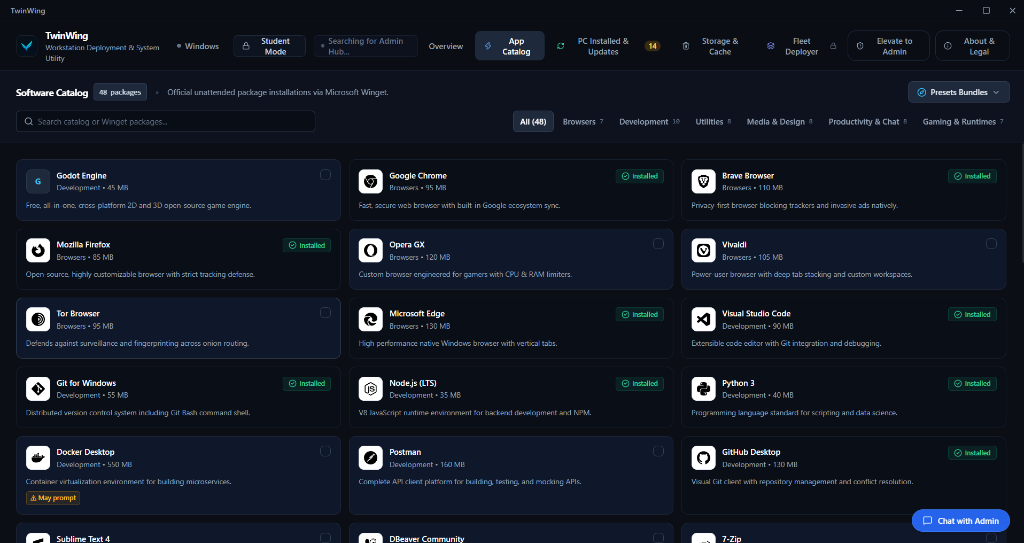
Search through 5,000+ Winget packages or select curated stacks. Automated FIFO queue prevents installer collisions and silent failure. 100% Free Forever.
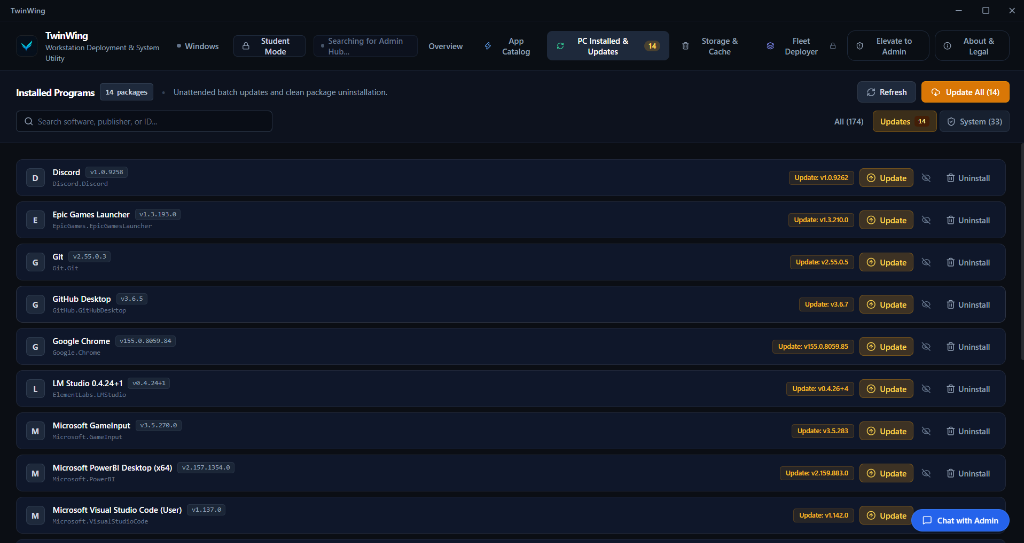
Auto-detect all installed programs on your PC via Windows Registry. Run silent 1-click batch updates and clean native uninstalls with zero bloatware.
Purge system temporary files, prefetch cache, diagnostic memory dumps, and trim working-set RAM to keep systems operating at peak performance.
Search developer tools, browsers, and productivity apps. TwinWing queues downloads and executes silent installations sequentially to prevent Windows installer collisions.
Deep Registry inspection auto-detects every installed application on the host machine. Version comparisons identify pending patches and update them in batch silently.
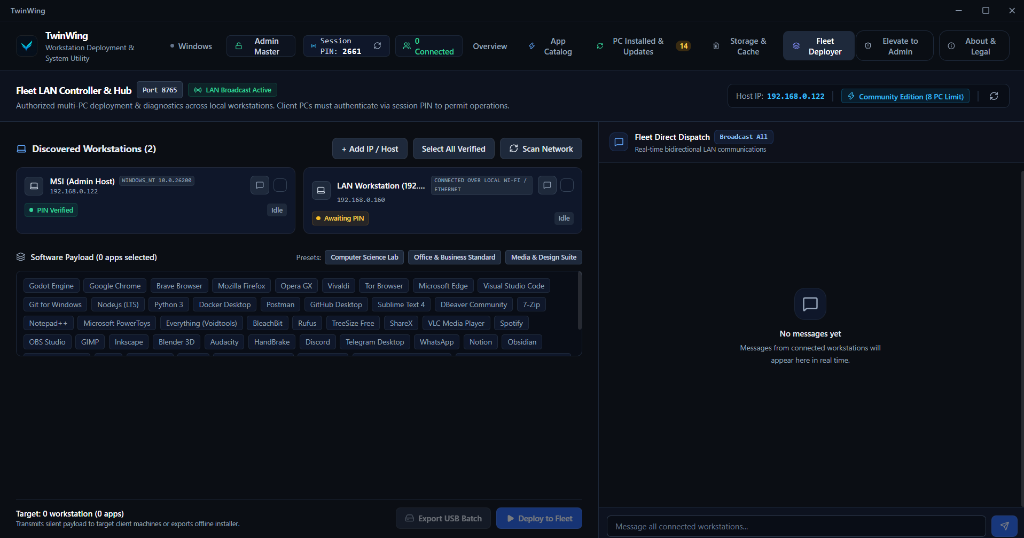
Orchestrate classroom labs, office computers, and local networks in real time over WebSocket & UDP discovery.
Client PCs announce themselves on port 8766. The Admin Master Hub automatically populates workstation cards across your subnet with zero manual configuration.
Select 10 software apps and deploy them simultaneously to 50 lab computers in 1 click over high-speed local 2-way WebSocket (Port 8765).
Lock client PCs into Student Mode to prevent unauthorized installations. Unlock Admin Master privileges via SHA-256 secure local password auth.
Full workstation installation, maintenance, and multi-PC LAN deployment for up to 8 computers out of the box with zero cloud dependency.
For students, IT administrators, computer labs, and office workstations.
Instant Winget catalog search and 1-click package installs.
Broadcast and deploy software to 8 local computers at a time.
Automated silent background execution with auto-recovery.
Direct 2-way real-time messaging between Teacher and Student nodes.
Instant junk purge, DNS flush, and system memory trimming.
Zero cloud databases, no invasive profiling, no personal data collection.
Everything you need to know about TwinWing and how it works.
Yes. TwinWing provides an intuitive, modern desktop interface on top of the official Microsoft WinGet package manager. It visualizes over 5,000+ packages, automates SHA-256 verification, and executes a strict sequential FIFO install queue to eliminate msiexec collisions and installation deadlocks.
While tools like Ninite offer a limited fixed list of ~80 consumer apps, TwinWing gives you access to the entire 5,000+ package Microsoft WinGet ecosystem with live search, 1-click updates, silent uninstalls, deep storage/RAM optimization, and multi-PC LAN deployment.
Yes. TwinWing includes a built-in Zero-Cloud LAN Fleet Deployer. IT administrators and teachers can broadcast application packages to multiple client PCs simultaneously over high-speed local WebSockets (Port 8765) without registering external cloud servers or domain controllers.
Yes! You get full access to the 5,000+ app catalog, sequential install queue, updater, uninstaller, deep system cleaner, and local multi-PC fleet deployment for up to 8 computers completely free forever with no credit card or account needed.
It runs 100% locally over your Wi-Fi or Ethernet network using high-speed WebSockets (Port 8765) and UDP auto-discovery (Port 8766). No cloud servers, external databases, or third-party tracking are required.
The Community Edition supports up to 8 connected workstations simultaneously across your local subnet. Larger multi-lab and enterprise tiers will be announced in future updates.
No. TwinWing is strictly local-first. We never collect personal documents, search queries, keystrokes, or registry contents. We only receive an anonymous, aggregated launch ping via Google Analytics to count daily active users and improve app stability. See our Privacy Policy for full details.